Email in the console
Odudu sends a little mail: a link to verify an address, a link to reset a password. A tenant needs somewhere to send it from. By default there is nowhere, and the mail is only written to the server's log, which is fine for trying things out and no use to a person waiting for a link. This page connects a tenant to a mail server and shows how its mail is doing. It needs the manage-tenant capability; the menu entry is Email under TENANT.
1. Read where the mail goes
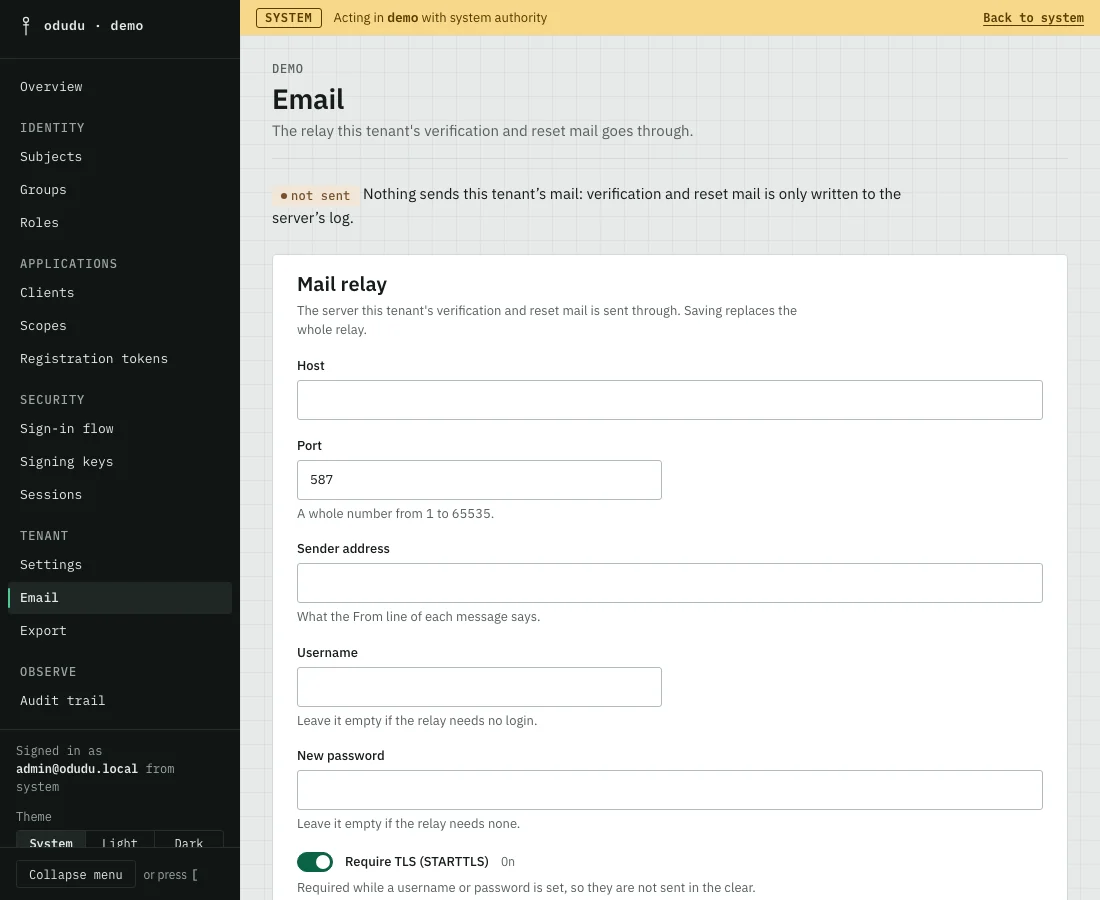
The status line at the top says one of three things. not sent means nothing sends this tenant's mail and it is only logged. deployment sender means the tenant has no relay of its own, so its mail goes through the one the deployment was started with. own relay means the tenant sends through the relay set below.
2. Set the relay
Under Mail relay, fill in the mail server the tenant should use.
- Enter the Host and the Port, a whole number from 1 to 65535. Port 587 is the usual one for a relay that takes mail from an application.
- Enter the Sender address, which is what the From line of each message says.
- If the server asks you to log in, enter the Username and a New password. Leave both empty if it does not.
- Leave Require TLS (STARTTLS) on. It is required while a username or password is set, so they are never sent in the clear.
- Save the section. It replaces the whole relay, so every field you want to keep must be filled in.
The password is stored, never shown again. To remove it, turn on Remove the stored password and save.
3. Send a test message
Under Test message, enter an address in Send to and choose Send test message. The console sends one message through the saved relay and tells you what the server answered. It uses the saved relay, so save first.
4. Watch the delivery
The Delivery list shows the latest mail the tenant sent or tried to send, newest first. Use Show to look at only Queued, Retrying, Failed or Sent messages, and Refresh to read it again. A message is failed once every attempt is spent. The list never shows a message's body, because it carries a link that signs somebody in.
Things that cannot be undone
Remove the relay deletes the tenant's own relay, and with it the stored password. The tenant then falls back to the deployment's sender, or to logging only. You confirm first, and you can save a relay again at any time, though you will need the password again.
Do the same through the API
The calls are in the smtp and mail areas of the admin API: the first reads, sets and removes the relay and sends the test, the second lists the delivery. The deployment-wide sender is set with the ODUDU_SMTP_* variables in the configuration reference.